
Configuration
All settings are made with the two buttons on the back of the clock.
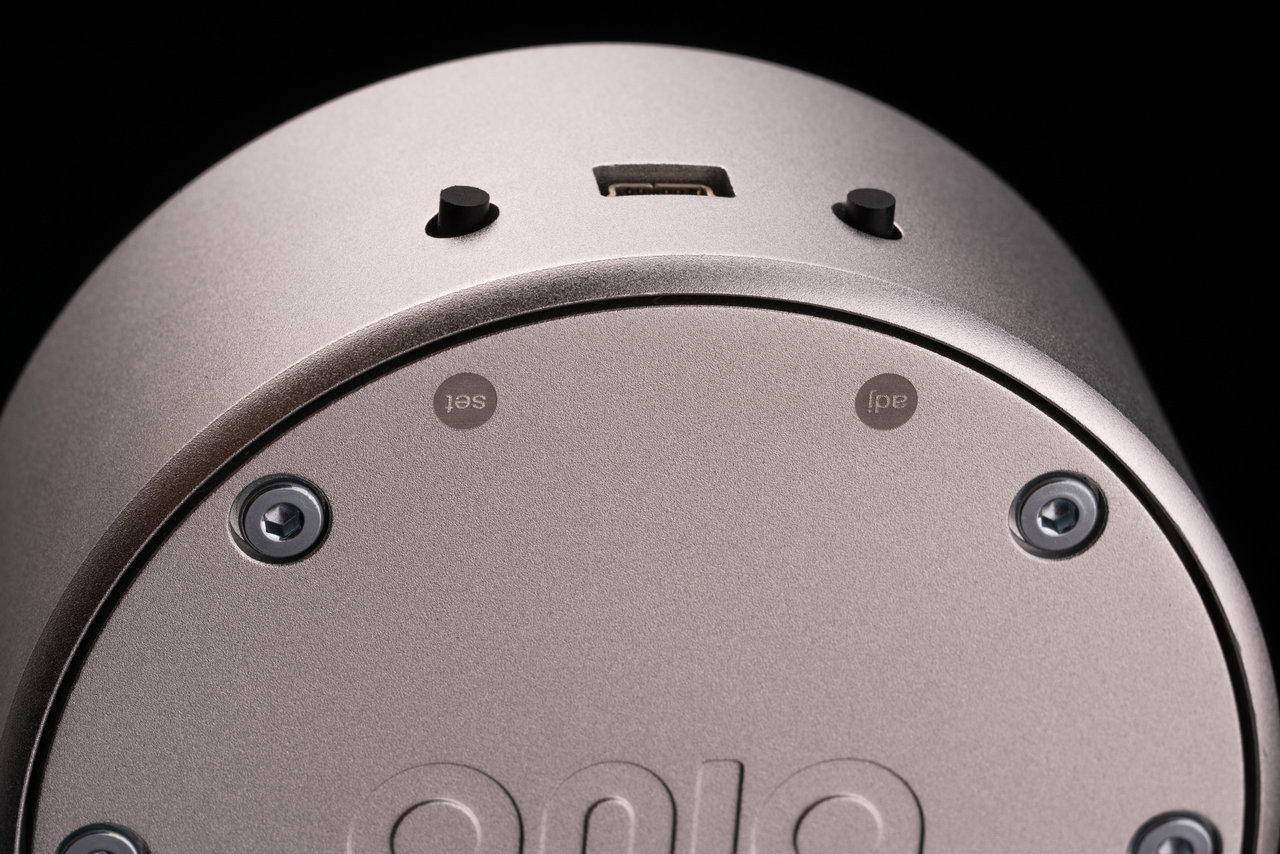
| Button | What it does |
|---|---|
| ADJ – adjust | cycles through the options, increments the lit digit |
| SET – set | enters a menu, moves to the next digit, confirms and returns |
Note
Blub has a single tube, so it shows everything one digit at a time – the time 10:45 appears as 1 · 0 · 4 · 5. Values you enter in the configuration work the same way: one digit after another.
The clock works in two modes: Time mode and Configuration mode.
Time mode
This is the mode in which the clock spends most of the time – displaying the current time. After power-up, the clock always starts in Time mode.
Configuration mode
- Hold SET for 3 seconds – the clock enters Configuration mode and shows 0.
- Press ADJ to scroll through the parameters 0 → 1 → … → 8.
- Press SET to open the parameter that is shown.
- Inside the parameter, ADJ changes the value (or the lit digit) and SET confirms it. After the last digit, SET saves the parameter and returns to the list of parameters.
- To go back to Time mode, scroll to 0 and press SET – or simply power-cycle the clock.
Tip
When setting up a new clock, start with parameter 1 and then continue with the others.
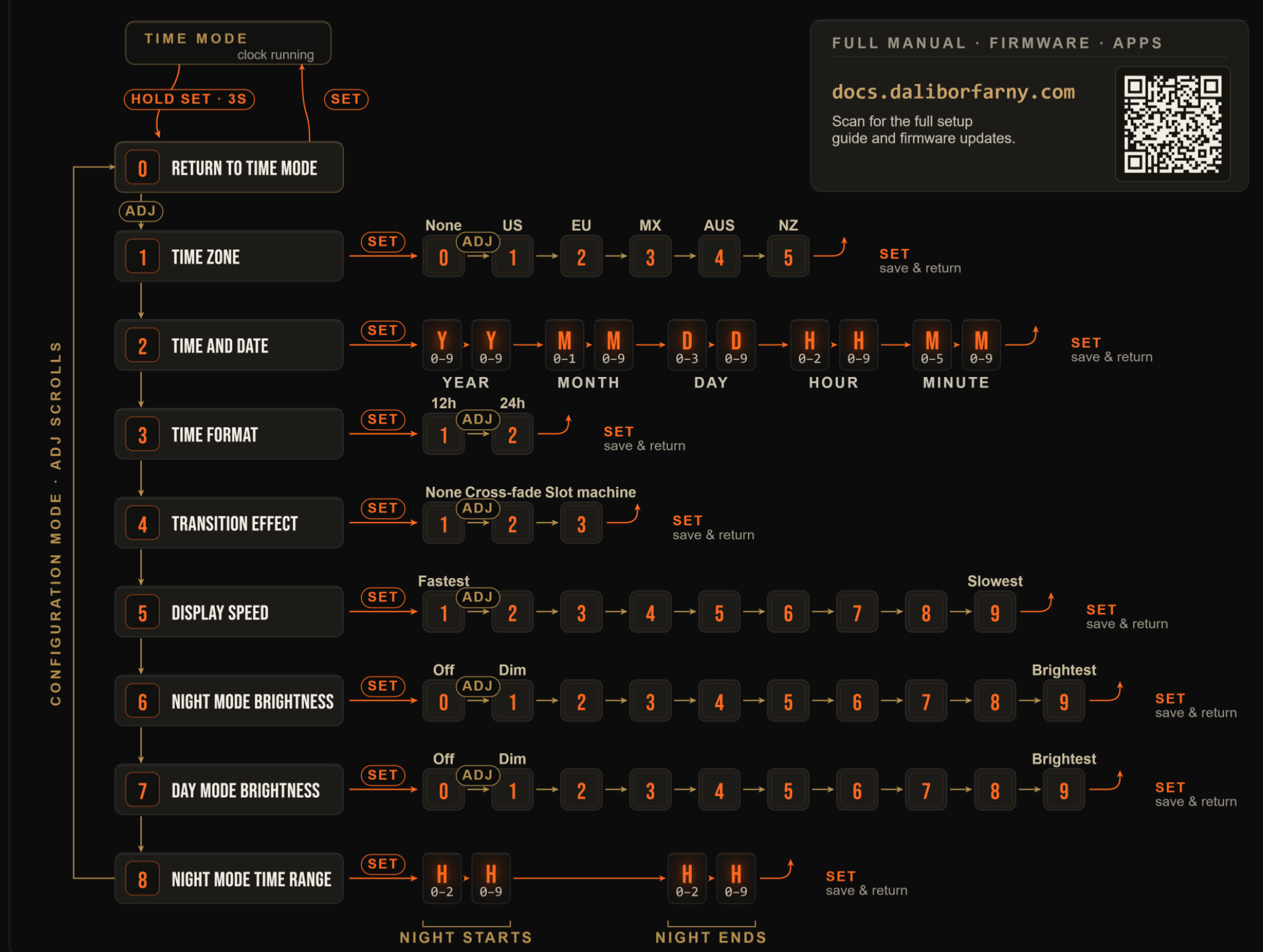
| # | Parameter | Values |
|---|---|---|
| 0 | Return to Time mode | – |
| 1 | Time zone (daylight saving time) | 0 none · 1 US · 2 EU · 3 MX · 4 AUS · 5 NZ |
| 2 | Time and date | YY MM DD HH MM – 10 digits |
| 3 | Time format | 1 = 12 h · 2 = 24 h |
| 4 | Transition effect | 1 none · 2 cross-fade · 3 slot machine |
| 5 | Display speed | 1 fastest … 9 slowest |
| 6 | Night mode brightness | 0 off · 1 dim … 9 brightest |
| 7 | Day mode brightness | 0 off · 1 dim … 9 brightest |
| 8 | Night mode time range | HH HH – night starts, night ends |
1 – Time zone
Tells the clock when to switch between summer and winter time (daylight saving time, DST). Choose the option for the place where the clock is:
- 0 – no daylight saving time (e.g. Japan, China, India, Arizona)
- 1 – US
- 2 – EU
- 3 – Mexico
- 4 – Australia
- 5 – New Zealand
Press ADJ until the option is shown, then SET to save and return.
2 – Time and date
Enter the current local time (what other clocks around you show) in 24-hour format – the clock works out daylight saving time from the date. The ten digits are entered one at a time: ADJ increments the lit digit, SET moves to the next one; SET after the last digit saves and returns.
| Digits | Meaning | Range of each digit |
|---|---|---|
YY |
year (last two digits) | 0–9 · 0–9 |
MM |
month | 0–1 · 0–9 |
DD |
day | 0–3 · 0–9 |
HH |
hour | 0–2 · 0–9 |
MM |
minute | 0–5 · 0–9 |
For example, 6 March 2021, 12:36 is entered as 2103061236:
2 SET 1 SET 0 SET 3 SET 0 SET 6 SET 1 SET 2 SET 3 SET 6 SET
3 – Time format
1 – 12-hour format, 2 – 24-hour format.
4 – Transition effect
How one digit changes into the next: 1 – none, 2 – cross-fade, 3 – slot machine.
5 – Display speed
How fast the time is shown, digit by digit: 1 – fastest … 9 – slowest.
6 – Night mode brightness
Display brightness during the night (by default 21:00–7:00): 1 – dim … 9 – brightest, 0 – display off during the night.
7 – Day mode brightness
Display brightness outside the night time range: 1 – dim … 9 – brightest, 0 – display off during the day.
8 – Night mode time range
When the night mode starts and ends, in whole hours (24-hour format). Enter four digits HHhh: HH – the hour the night starts (0–2 · 0–9), hh – the hour it ends (0–2 · 0–9).
For example, night from 21:00 to 7:00 is entered as 2107:
2 SET 1 SET 0 SET 7 SET